Clean Like
- 3.9
- Rating
- 50.00K
- Installs
- Free
- Price

 Analysis by App-foxy
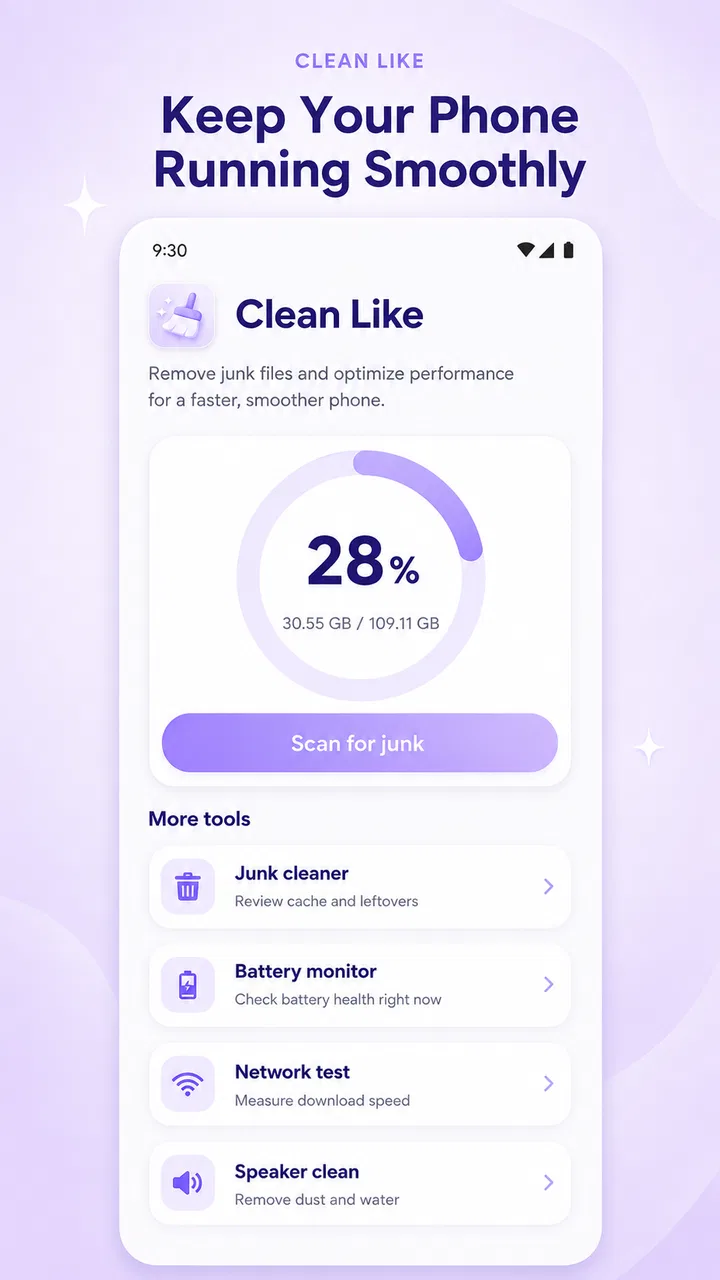
I spent time with Clean Like as a practical Android tools app, and my first impression was that it aims to cover several small maintenance jobs in one place rather than become a full system-management suite. Its focus is straightforward: removing unwanted files, checking battery information, testing connection speed, and refreshing a phone’s speakers. That combination makes sense for someone who wants a compact utility instead of several separate downloads.
The app comes from KAJO TECH and is available free of charge. That matters here because its value is easy to judge: you can try the complete available experience without deciding whether a subscription or one-time purchase is worthwhile. It is rated for Everyone, so the intended audience is broad, including people who are not especially confident with Android settings.
How Clean Like fits into everyday phone maintenance
The app belongs to the tools category, but it is better understood as a small collection of quick checks. I would not treat it as a replacement for Android’s built-in storage page, battery settings, or a dedicated network-testing service. Instead, its appeal is convenience. The same app gives you a place to begin when your phone feels cluttered, your battery seems to be dropping quickly, your internet feels slow, or the speaker sounds muffled.
You May Also Like

 Pandora - Music & Podcasts
Pandora’s Music Is Easy to Start, but Harder to Recover
Pandora’s strength is its low-effort path from a seed to a station. Its weak spot is how much confidence it asks you to place in connection, setup, and quiet recovery.

 AccuWeather: Weather Radar
AccuWeather Review: A Quick, Clear Forecast for Everyday Decisions
For everyday plans, the best forecast is the one you can understand quickly. AccuWeather makes rain timing, radar, and local conditions easy to act on, with a few trade-offs.

 Hill Climb Racing
Why Hill Climb Racing Still Turns Crashes Into One More Run
A tiny car, a bumpy hill and one more upgrade: Hill Climb Racing keeps resurfacing because its simple chaos makes every near-miss feel personal.

 AliExpress - Shopping App
AliExpress Makes Global Shopping Feel Personal, but Shoppers Bear the Risk
AliExpress turns a global marketplace into a pocket-sized discovery engine. Its reach is useful, its shopping loop compelling, and its trade-offs easy to miss.

 Lords Mobile: Kingdom Wars
Lords Mobile Is a Kingdom-Building Routine, Not a Quick Match
A case-by-case verdict on the building, battles, device demands, and social commitments that make Lords Mobile rewarding for some players and exhausting for others.

 PDF Scanner app - TapScanner
TapScanner Makes Paperwork Easier to Capture, Check, and Share
TapScanner makes scanning with a phone feel less like a rescue operation and more like a dependable step in getting work done. Its capture tools are useful, though not flawless.
More From Our News Desk
View All News


That all-in-one approach is useful because these problems often appear together. A phone with very little free storage can feel sluggish, while a weak connection can be mistaken for a device problem. Having cleaning, battery monitoring, speed checking, and speaker refreshing beside one another encourages a more sensible troubleshooting routine: check the obvious causes first, then decide whether anything more serious needs attention.
The current release is version 3.0.0, and the app requires Android 9 or later. In practical terms, that keeps it relevant to a wide range of still-used Android phones, while owners of older devices should check compatibility before planning to rely on it. The app has passed fifty thousand installs, which suggests that it has found an audience, although popularity alone does not tell me whether every tool will suit every phone.
What the free access really means
There is no purchase decision to calculate here: Clean Like is free. That makes the download easy to justify for occasional maintenance, especially if you do not want to pay for a specialized cleaner or install four separate utilities. It also changes how I judge its limitations. A few rough edges are easier to accept when the app costs nothing, but they still matter if you expect highly detailed diagnostics or professional-level control.
I would install it for convenience, not because free automatically means better. Android already includes tools for viewing storage use, checking battery consumption, and managing applications. A separate speed test can also be more useful when it offers a well-known testing method and clear server information. Clean Like earns its place only when its combined workflow saves you time and makes these basic checks easier to reach.
The public score sits at a 3.9 average from around seventy ratings. That is enough to show that people have tried it, but it is not a reason to assume universal reliability. I read that kind of score as a prompt to keep expectations realistic: useful for simple tasks, worth testing on your own phone, and not something I would trust blindly with important files or decisions about hardware failure.
Cleaning without treating every file as disposable
The cleaning function is the part most likely to attract downloads, but it is also where caution matters most. A junk-file tool can be convenient when temporary material has accumulated, yet a large number of files does not automatically mean they are safe to erase. Before confirming a cleanup, I would look at what the app identifies and avoid removing anything whose purpose is unclear.
My preferred workflow is to use cleaning as a review step rather than an automatic rescue button. First, I check Android’s own storage breakdown so I know whether the real problem is cached material, large videos, unused applications, or something else. Then I use Clean Like to look for quick cleanup opportunities. This prevents a common mistake: expecting a cleaner to create meaningful space when the storage is actually occupied by personal media.
A useful, less obvious habit is to clean before a specific task rather than on a rigid schedule. For example, if I need room to record a long video or install a large update, I can inspect temporary clutter first and then confirm the available space afterward. That is more sensible than repeatedly cleaning a phone that is already running comfortably, because unnecessary maintenance can become busywork.
I would also avoid using any cleaner as a substitute for backing up photos, documents, or messages. A cleanup tool may help identify disposable material, but it cannot replace a deliberate backup routine. If the phone belongs to someone who tends to tap confirmation buttons quickly, I would guide them through the first scan and show them how to distinguish temporary files from personal content.
Battery monitoring that helps with questions, not miracles
The battery section is useful when you want a quick view of battery behavior, but monitoring is not the same as repairing battery health. No utility can reverse normal battery aging through a button. If a phone loses charge quickly, the more valuable investigation is usually to inspect which applications are consuming power, whether the screen is unusually bright, and whether poor reception is forcing the device to work harder.
I found the battery tool most useful as a starting point for comparisons. Check the phone during a normal day, then look again after a period of heavy navigation, video playback, or gaming. A single reading can be misleading, while repeated observations can reveal a pattern. If the drain is sudden, the phone becomes unusually hot, or the battery behaves erratically, I would move to Android’s system settings or professional support rather than expecting this app to diagnose a failing component.
There is also a trade-off between simplicity and detail. A compact monitor is easier for a casual user to understand, but advanced users may want more granular history, application-level breakdowns, charging measurements, or system diagnostics. Clean Like makes more sense for someone asking, “Why does my phone feel different today?” than for someone trying to conduct a technical battery test.
Using the speed check without blaming the wrong device
The speed-testing tool can help separate a network problem from a phone problem. If webpages load slowly, I would run a check near the router, then repeat it where I normally use the phone. I would also compare Wi-Fi with mobile data when possible. That simple sequence can reveal whether the issue follows the phone or stays tied to one connection.
The important insight is that a speed result is a snapshot, not a permanent rating of your internet service. Results can change with distance, congestion, signal strength, and the selected connection. If Clean Like reports a disappointing result, I would repeat the test before changing router settings or blaming the handset. For a more complete diagnosis, a dedicated network tool may be preferable because it may provide richer information about latency and consistency.
I would use this feature when helping a family member who says, “The internet is broken.” It gives us a quick shared reference instead of relying on impressions. Still, I would not use one result as evidence for a complaint to an internet provider. Several tests at different times are more meaningful, and the app itself should be treated as a convenient check rather than a laboratory instrument.
What the speaker refresh option can and cannot do
The speaker-refreshing function is an interesting addition because it addresses a physical-feeling problem through software. It may be useful after the phone has been exposed to moisture or when sound seems dull, but I would approach it carefully. A speaker tool cannot repair torn hardware, remove every kind of blockage, or guarantee that a quiet speaker is caused by trapped moisture.
If I suspected moisture, I would first disconnect accessories, avoid charging until the phone is safely dry, and follow the manufacturer’s guidance. I would not repeatedly play loud tones at maximum volume or treat the feature as permission to ignore visible liquid damage. The sensible role for this tool is a cautious first attempt when the problem appears minor, followed by normal audio testing at a moderate level.
This is another place where Clean Like is convenient but not definitive. A hardware fault, damaged grille, distorted audio, or persistent imbalance deserves a proper inspection. The feature may save a trip to support when the cause is simple, but it should not create false confidence about the phone’s physical condition.
A realistic routine for a slow-feeling phone
Imagine that I am helping someone whose phone has become frustrating over the course of a busy week. Photos are not saving, applications open slowly, the battery seems weaker, and a video call keeps freezing. I would not press every maintenance button immediately. I would begin by checking storage, then use the cleaning area to review removable clutter. After that, I would inspect battery behavior and run a connection check in the same room where the call failed.
If the network result is poor only in that room, the phone may be fine and the placement or Wi-Fi coverage needs attention. If storage is nearly full, removing large personal files or unused applications will probably matter more than clearing small temporary items. If the battery is draining while the phone is idle, Android’s battery settings may reveal the responsible application. Finally, if audio remains muffled after a cautious speaker refresh, I would stop experimenting and consider hardware support.
This routine shows the app’s strongest practical idea: it puts several first checks together. It also shows why the app should not be treated as an automatic “make my phone faster” button. The best result comes from identifying the actual bottleneck, not from running every available function in sequence.
Who will get the most value from it
I think Clean Like suits casual Android users who want a simple maintenance dashboard. It is especially convenient for people who regularly help relatives with storage, battery, connectivity, or speaker complaints. Instead of explaining four different settings paths, I can point them toward one familiar tool and then teach them to review results before confirming changes.
It can also suit owners of older compatible phones who prefer a lightweight troubleshooting habit. The Android 9 minimum keeps the potential audience broad, and the Everyone age rating makes it approachable for general household use. Since access is free, it is reasonable to try it on a spare device or a family member’s phone without committing money.
The app is less compelling for power users who already know Android’s system panels and maintain separate specialist tools. Those users may prefer deeper storage analysis, detailed battery histories, more transparent network testing, or hardware-focused diagnostics. I would also skip it if you are looking for automatic performance gains, guaranteed battery repair, or a replacement for a backup and security strategy.
Where alternatives may be the better choice
Android’s built-in storage manager is often the safer first stop for understanding what occupies space, because it is closely tied to the operating system and installed applications. A dedicated file manager may be better when the real task is finding large videos, duplicate downloads, or folders you recognize personally. Clean Like is more convenient when you want a quick scan, but convenience should not replace visibility.
For battery concerns, system settings are usually more useful when you need to identify individual applications and background activity. For connection problems, a dedicated speed-testing service may be preferable when you need repeatable results, latency details, or a history of tests. For speaker issues, manufacturer support is the stronger option when there is physical damage or persistent distortion.
That does not make Clean Like unnecessary. Its advantage is the short path between several everyday checks. The trade-off is that a single general-purpose app may offer less depth in each area than a specialist alternative. I would keep it as a convenient first-response tool, not as the only diagnostic app on a phone that matters for work or critical communication.
My verdict on the free download
After using Clean Like as a general maintenance companion, I see a clear but limited value proposition. It gathers four useful starting points—cleanup, battery observation, connection checking, and speaker refreshing—without asking for payment. That is enough to make it worthwhile for casual users who want a simple place to begin when a phone feels cluttered or behaves oddly.
The app works best when I use it deliberately: inspect before deleting, compare battery behavior over time, repeat speed checks in relevant locations, and treat speaker refreshing as a cautious experiment rather than a repair. Those habits turn a basic utility into a more useful troubleshooting routine.
My recommendation is to try it if you want free, approachable tools in one package and your expectations are modest. I would skip it in favor of built-in Android controls or specialist utilities if you need deep diagnostics, detailed histories, or certainty about hardware problems. For everyone else, Clean Like is a practical first stop—not a magic performance booster, but a convenient way to investigate common phone annoyances before deciding what to do next.
FAQs for Clean Like
01What is Clean Like, and what does the app do?
Clean Like is designed to help users organize and improve their device by identifying items that may no longer be needed, such as duplicate files, large media, temporary data, or unused content. Its exact tools can vary by operating system and version, so review the available features on the download page before installing. The app is intended to simplify maintenance rather than replace your phone’s built-in storage settings.
02Is Clean Like safe to use on Android or iOS?
Clean Like should be downloaded only from an official app store or a verified developer link. Before granting access, check the permissions requested and make sure they match the app’s cleaning features. Because a cleaner may need access to photos, files, or storage, users should read the privacy policy carefully. Always back up important photos, documents, and videos before deleting anything.
03Can Clean Like delete important photos or files by mistake?
Any cleaning application that suggests duplicate, unnecessary, or large files requires careful review before confirmation. Clean Like may present recommendations, but the final decision should remain with the user. Check selected items individually, especially photos, downloads, messaging attachments, and work documents. Avoid automatic deletion unless you are certain that the files are safely backed up or genuinely no longer required.
04Does Clean Like really improve storage space and phone performance?
Clean Like can help recover storage when it finds removable files, duplicates, or unused content, but the results depend on how much unnecessary data is present on your device. Freeing storage may make a full phone feel more responsive, although a cleaner cannot solve every performance problem. It will not replace system updates, restarting the device, removing demanding apps, or managing background activity.
05Is Clean Like free, and are there subscriptions or in-app purchases?
The availability of free tools, premium features, advertisements, and subscriptions may differ between the Android and iOS versions of Clean Like. Review the store listing and in-app purchase screen before starting a trial or approving payment. Pay particular attention to renewal terms, trial duration, and cancellation instructions. If you only need occasional cleanup, compare the free features with the paid plan first.
Pros
- Quickly removes junk files and frees up storage space.
- Simple interface makes cleanup tasks easy for beginners.
- Helps identify large files that may be using unnecessary space.
- Useful duplicate-file scanning can reduce clutter.
- Cleanup suggestions can make routine maintenance more convenient.
Cons
- Some scans may take time on devices with extensive storage.
- Results should be reviewed to avoid deleting files you still need.
- Certain tools or features may require a premium upgrade.
- Cleaning performance can vary depending on device and Android version.
- Background features may use extra battery or system resources.

Clean Like
Gallery